
 English
 Spanish
Highster Mobile Review 2026: Is It Worth It? | TheWiSpy
Posted in TheWiSpy alternatives by admin
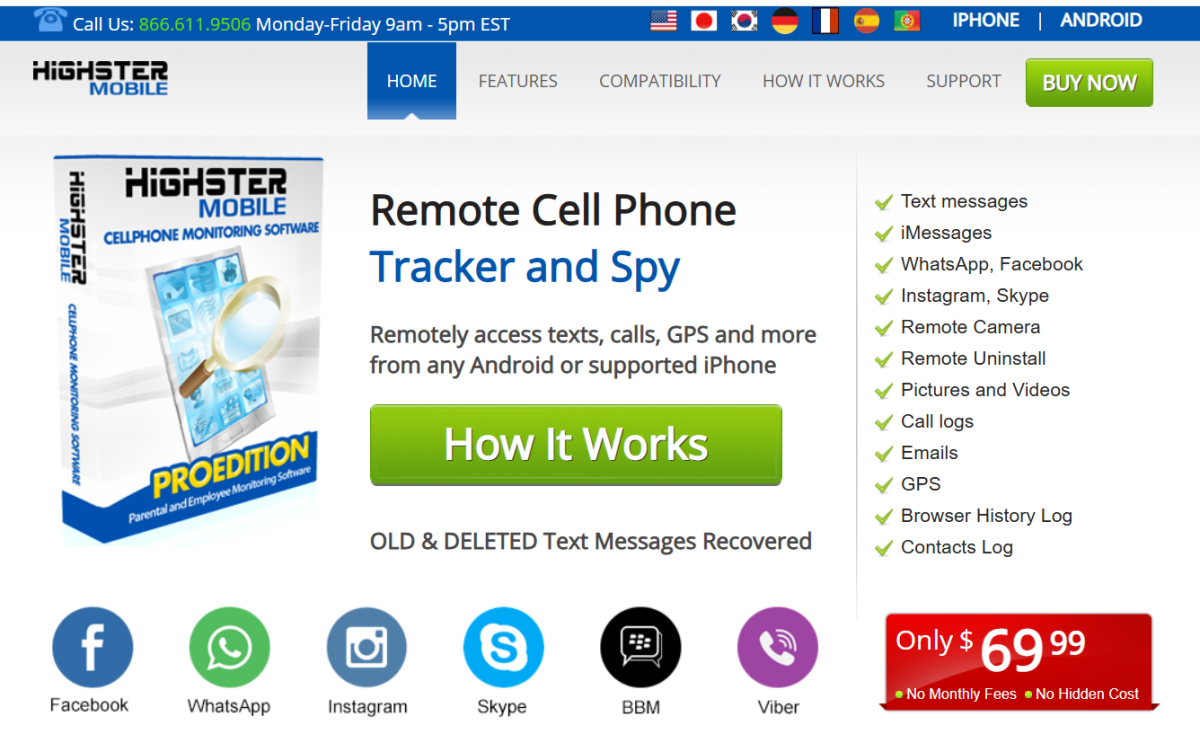
This Highster Mobile review explains what the app does, how it works, and whether it is worth buying. Parents often look for monitoring software to understand their children’s online lives, and Highster Mobile is one of the older names in this space. Below we cover its features, setup, pricing, and the reputation concerns you should know about.
Use these points to navigate the review:
- What is Highster Mobile?
- Customer ratings and reputation
- How does the app work?
- Supported devices
- Main features
- How to install it
- Pricing
Highster Mobile Review: What Is Highster Mobile?
Highster Mobile is a monitoring app for phones and tablets. For example, parents can use it to keep an eye on their children’s calls, messages, location, and browsing. Similarly, businesses can use it on company-owned devices as part of employee monitoring, as long as staff are told.
Highster Mobile Review: Customer Ratings
Ratings are the biggest concern. At the time of the original review, Highster Mobile held 2.9 stars on Trustpilot and only 1.37 stars on Sitejabber . Also, reviewers on Sitejabber mentioned refund policy problems.
Therefore, read recent reviews yourself and check the refund terms before you pay. In addition, avoid paying by unusual methods, because refunds are harder to get.
How Does the App Work?
You buy a license and install the app on the device you want to monitor. Once it is configured, it records activity and uploads it to an online dashboard. As a result, you can review everything from any browser.
However, installation needs physical access to the device. Because the app collects a lot of personal data, install it openly, together with your child.
Highster Mobile Review: Supported Devices
According to the company, the app works on Android and iOS devices. It also claims to support all OS versions and models, but we could not verify that . Therefore, confirm that your child’s exact phone and OS version are supported before you buy.
Highster Mobile Review: Main Features
Here are the tools most useful for parents.
Text and iMessage Monitoring
You can monitor text messages, including iMessage chats with photos, videos, and shared locations. Because many teens prefer texting to calls, this feature can reveal risky conversations. Talk with your child about what you find.
GPS Location Tracking
GPS tracking shows your child’s location, so you can check that they are at school or a friend’s home. Likewise, employers can see where company devices are during working hours.
Social Media Monitoring
Unfortunately, social media can expose teens to catfishing, risky challenges, and contact from strangers. With this tool, parents can monitor Facebook, Twitter, and Instagram activity to learn who their kids talk to.
Photo, Video, and Browsing History
The app lets you review photos and videos on the device and see visited websites, bookmarks, and searches. For example, this can show whether your child has run into adult content, which opens the door to a useful conversation.
Call Logs Monitoring
In addition, you can view dialed and received calls, with contact details, timestamps, and durations. See our list of the top call history tracker apps for alternatives.
Highster Mobile also advertises remote camera activation. We left that out of our feature list on purpose. Turning on someone’s camera without their knowledge can break privacy and surveillance laws, so we advise against it.
How to Install the App
First, buy a license on the official website. Next, check your email for the download link and activation key. Then install and configure the app on your child’s device, and finally log in to the dashboard.
Highster Mobile offers three installation methods, and all of them need physical access to the device:
- Over the air (OTA): open the download link in the device’s browser, then install and configure the app.
- QR code: scan the code with the device to start the download.
- USB: download the file to a computer, then transfer it to the device with a cable.
Fortunately, the company provides an installation guide, so follow it for exact steps on your device.
Highster Mobile Pricing: How Much Does It Cost?
At the time of the original review, Highster Mobile offered two versions with one-time payments :
| Monthly | 3 Months | 6 Months | |
|---|---|---|---|
| Android | $39.99 /mon | $19.99 /mon | $15.99 /mon |
Prices and payment models change, and one-time pricing is unusual for monitoring apps. Consequently, confirm exactly what you get, how long it lasts, and what the refund policy says.
Highster Mobile Review Verdict
Overall, Highster Mobile offers a solid list of monitoring tools. On the other hand, its poor customer ratings and refund complaints are real risks, and its stealth-focused marketing invites legal trouble. Be open with your child about monitoring, since this is a legal requirement in many places. Monitoring another adult without consent is illegal in many regions. For general guidance, read the FTC’s advice on protecting kids online.
Finally, we hope this Highster Mobile review helps you decide. If you prefer simpler, transparent controls, compare it with FamiSafe or Qustodio.
READ MORE: iKeyMonitor Review, HoverWatch Review, FamiSafe Review

Related Posts
GuestSpy Review 2026: Is It Safe to Use? | TheWiSpy
This GuestSpy review answers a simple question first: is the...
Read More
XNSpy Review 2026: Features, Pricing & Safety | TheWiSpy
This XNSpy review looks at what the app does, which...
Read More
TheTruthSpy Review 2026: Is It Safe? Risks & Alternatives
This TheTruthSpy review answers one question first: is the app...
Read More
Install TheWiSpy Monitor App Now and Start Exploring Your Kid’s and Employee’s Digital Space
- Protect Your Kids
- Secure Your Business
- Backup Personal Data

 Affiliate Login
 Spanish