
 English
 Spanish
HoverWatch Review 2026: Is It Worth Buying? | TheWiSpy
Posted in TheWiSpy alternatives by admin
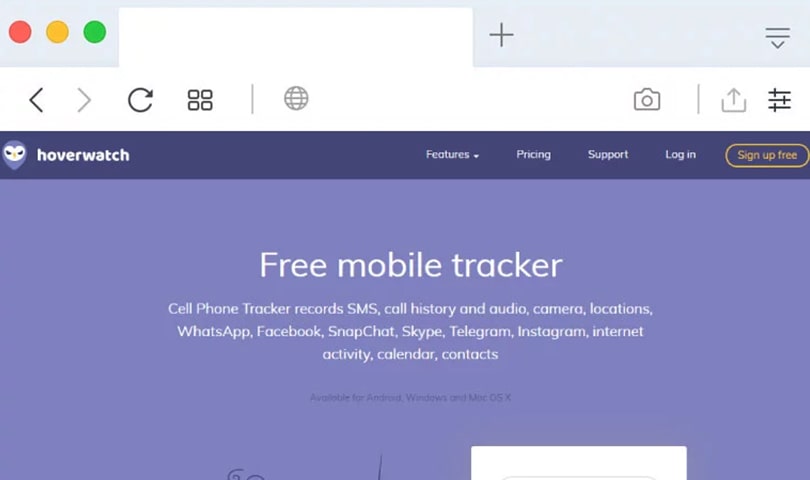
This HoverWatch review explains what the app does, how it works on Android, and whether it suits your family. Cyberbullying, online grooming, and risky chats are growing concerns, so many parents want a practical way to stay involved in their child’s digital life. HoverWatch is one option, and below we look at its strengths and limits.
HoverWatch is a parental control app that records phone activity such as calls, texts, browsing, and location. It runs in the background, so it does not slow the phone down. According to the official HoverWatch parental control page, the app should be set up on a device you own, with your child informed about the monitoring.
Use these points to navigate this HoverWatch review:
- What is HoverWatch?
- How does HoverWatch work?
- Which devices does HoverWatch support?
- What are the main HoverWatch features?
- How to install HoverWatch on your child’s Android phone
- How much does HoverWatch cost?
- Should you tell your child about HoverWatch?
HoverWatch Review: What Is HoverWatch?
HoverWatch is monitoring software that helps parents see their child’s phone activity, screen use, and social media usage. In other words, it is a way to stay informed rather than a replacement for talking with your kids. The company says more than one million people use it.
Many parental control apps focus on blocking content. HoverWatch, by contrast, focuses on recording and reporting activity, so you can start conversations about anything that worries you.
HoverWatch Review: How Does the App Work?
Setup takes three steps. First, you sign up for a free online account with an email and password. Next, you download and install the app on your child’s phone from your account. Finally, you review all recorded data in the online dashboard.
After installation, the app runs quietly in the background. As a result, normal phone use is not disrupted. You can then check activity from any device with a browser.
HoverWatch Review: Which Devices Are Supported?
HoverWatch’s parental control page is built around Android phones and tablets. According to the company, it works on any Android device without root access, so all monitoring features are available without modifying the phone.
However, the page does not describe iPhone support. Therefore, if your child uses an iPhone, confirm compatibility on the official site, or consider an alternative such as FlexiSpy.
HoverWatch Review: Key Features of the App
The feature list is broad. Here are the tools most relevant to parents.
Call and Text Monitoring
You can track incoming and outgoing calls, record phone calls, and read sent and received text messages. Consequently, you can see who your child talks to and spot unknown or risky contacts early. For more background, see our guide on how to read text conversations.
Social Media Monitoring
The app covers popular platforms, including Facebook Messenger, WhatsApp, Telegram, Instagram Direct, and Snapchat. It also covers dating apps like Tinder, which is useful if you suspect your child is meeting people online. Because of this, you can talk openly about who they are chatting with.
Location Tracking
GPS tracking shows your child’s real-time location and lets you review location history. In addition, the app sends a notification whenever the device switches to a different SIM card.
Browser and Internet History
You can view the sites your child visits and their internet history. This helps you notice inappropriate content or unhealthy habits.
Photos, Videos, and Email
HoverWatch gives access to photos and videos on the device and lets you monitor email activity. Together, these show a fuller picture of your child’s online life.
Keyboard Tracker
The keyboard tracker shows what your child types, from search queries to chat messages. Since this is a sensitive feature, use it with your child’s knowledge.
HoverWatch Review: How to Install It on Android
Installation is straightforward. Follow these steps with your child present:
- Visit the HoverWatch website and click “Sign up free.”
- Enter your email and set a password, then agree to the terms.
- Open your online account and choose the Android download.
- Install the app on your child’s phone and grant the permissions it requests.
- Sign in to the dashboard from your own device to view recorded activity.
Permission prompts and security warnings vary by Android version. For that reason, follow the on-screen instructions and check the HoverWatch help center if you get stuck.
Should You Tell Your Child About HoverWatch?
Yes. HoverWatch itself asks every customer to inform the person using the device that monitoring is active. In many regions, notifying the device user is also a legal requirement. Moreover, an open conversation about online safety usually works better than secret monitoring, because teens are more likely to come to you when something goes wrong.
The company also advises checking your local laws. Monitoring another adult without their consent is illegal in many places, so keep HoverWatch for your own minor children. For general guidance, see the FTC’s advice on protecting kids online.
HoverWatch Review Verdict
Overall, HoverWatch is a feature-rich parental control app for Android. Its call, text, social media, and location tools give parents real visibility. On the other hand, iPhone support is unclear, and support runs through an online help center, so expect some waiting. If you are unsure, try the free signup first and confirm compatibility before you subscribe.
READ ALSO: TheWiSpy Review, Highster Mobile Review

Related Posts

Kaspersky Safe Kids Review: Is It Worth It in 2026?
Kaspersky Safe Kids Review: Is This Parental Control App Worth...
Read More
GuestSpy Review 2026: Is It Safe to Use? | TheWiSpy
This GuestSpy review answers a simple question first: is the...
Read More
XNSpy Review 2026: Features, Pricing & Safety | TheWiSpy
This XNSpy review looks at what the app does, which...
Read More
Install TheWiSpy Monitor App Now and Start Exploring Your Kid’s and Employee’s Digital Space
- Protect Your Kids
- Secure Your Business
- Backup Personal Data
 Affiliate Login

 Spanish