
 English
 Spanish
iKeyMonitor Review 2026: Is It Worth Your Money? | TheWiSpy
Posted in TheWiSpy alternatives by admin
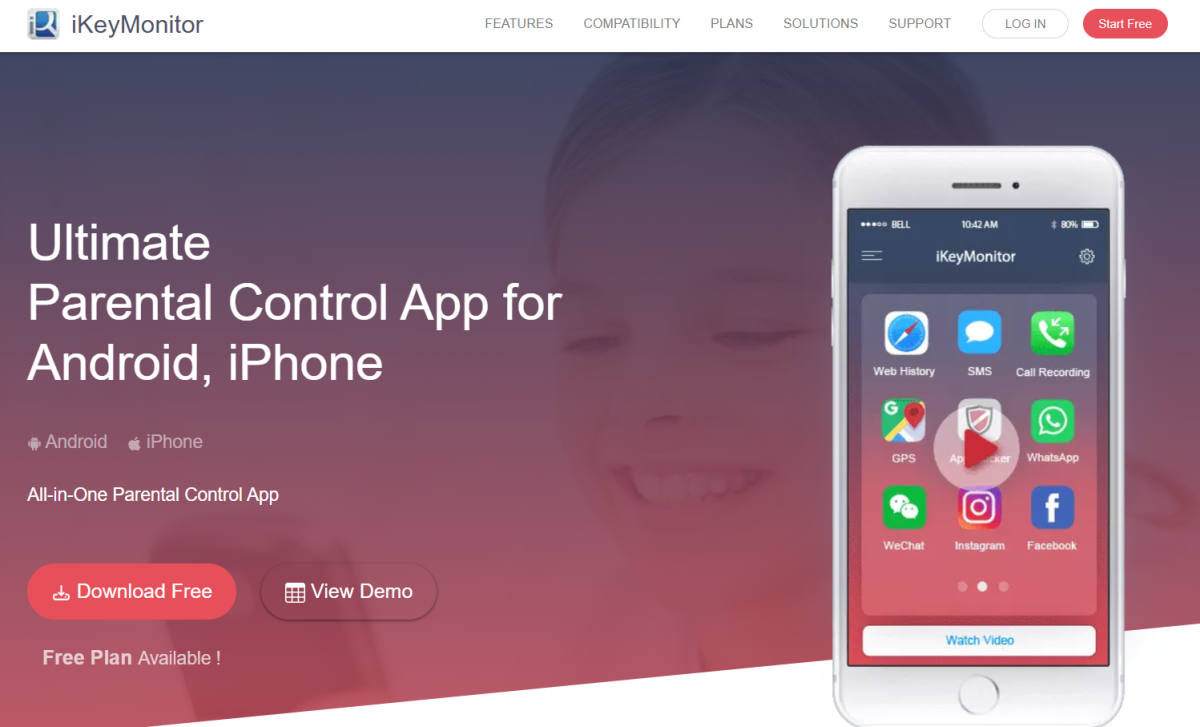
This iKeyMonitor review looks at what the app does, which devices it supports, and whether it is worth your money. Concerns about your child’s online safety have probably brought you here. Choosing a monitoring app can be hard, so we break down the features, setup, and pricing below.
Parents once relied on conventional tactics to keep kids in line. Today, however, busy schedules and constant connectivity make a child monitoring app a practical help. iKeyMonitor is a well-known option that lets parents oversee their children’s phones, tablets, and computers remotely.
Here are the key points of this iKeyMonitor review:
- What is iKeyMonitor?
- How does iKeyMonitor work?
- Which devices does iKeyMonitor support?
- What are the key features of iKeyMonitor?
- How to install iKeyMonitor on your child’s device
- How much does iKeyMonitor cost?
iKeyMonitor Review: What Is iKeyMonitor?
iKeyMonitor is both a monitoring tool and a parental control solution. With it, you can detect online dangers and restrict harmful content. Moreover, you can set screen time limits to build healthy device habits. For a wider comparison, see our guide to parental control apps.
Because the app records a lot of activity, use it openly. If you worry about what your teen does online, talk with them first, and then set up iKeyMonitor together.
iKeyMonitor Review: How Does the App Work?
After installation, iKeyMonitor connects to the operating system of your child’s device. It then uploads activity data to a web-based server. As a result, you can review everything from an online control panel on any browser.
To get started, you need to create an account, choose a plan, and configure the app on your child’s device. Fortunately, the process is simple.
iKeyMonitor Review: Which Devices Are Supported?
iKeyMonitor supports Android and Apple devices. In addition, its companion product, Easemon, covers Windows and macOS computers. Advanced features may require rooting an Android device or jailbreaking an iPhone. On the other hand, standard monitoring works without either.
- Android: Android OS 2.3 and Above
- iOS: iPhone/iPad ios 14.x and below
- Windows (Easemon): Windows 7 to 10
- MacOS (Easemon): MacOS 10.7 and above
Since requirements change, check the official site before you buy. Note also that installation on Android needs physical access to the device.
iKeyMonitor Review: Key Features of the App
iKeyMonitor offers a wide range of tools. Below are the ones most useful for parents.
SMS and Messenger Monitoring
If your child is glued to texting, you may want to see their chats. iKeyMonitor lets you read sent and received text messages, which can reveal sexting or inappropriate language. For best results, discuss what you find rather than just reacting to it.
Call Recording, Call Logs, and Contacts
Knowing who your child talks to matters, especially with catfishing and online deception on the rise. iKeyMonitor records incoming and outgoing calls, so you can listen to recorded calls. Furthermore, it shows call duration, timestamps, and saved contacts.
Keystroke and Browsing History Tracking
Kids type many searches and messages every day. By tracking keystrokes, you can see whether your child looks for offensive or violent content. Similarly, browsing history shows whether they are drawn to adult sites or dangerous online challenges.
GPS Tracking and Geofencing
You can track your child’s GPS location whenever you need to. In addition, geofencing lets you mark unsafe zones and sends an alert when your child enters one.
App Monitoring and App Blocking
iKeyMonitor lists the apps installed on your child’s phone, which helps you spot age-inappropriate ones. Once you find them, you can block dating and gambling apps directly from the control panel.
Screen Time Restrictions
Too much screen time harms both physical and mental health. Therefore, iKeyMonitor lets you set daily limits for phones and tablets and build healthier habits.
Other iKeyMonitor Features
The app also lets you read emails, view multimedia, check scheduled events, and review voice notes.
iKeyMonitor Review: How to Install It on Your Child’s Device
Installation differs between Android and iOS. On Android, you need physical access to the device. On iOS, by contrast, no such access is required. Please tell your child before you begin.
Create Your iKeyMonitor Account
- Open the official iKeyMonitor website and click “Sign Up.”
- Select the device type, such as Android.
- Confirm whether you have physical access to the device.
- Enter your email and password to finish signing up.
- Check your inbox for the email with your login details.
iKeyMonitor Android Setup
- Unlock your child’s Android device.
- Open the iKeyMonitor website in the browser and log in.
- Select Android and choose the option to download the app directly on the device.
- Download and install the app.
- Allow the permissions and follow the configuration prompts.
- Finally, log in from any browser to view activity.
Steps and permission screens vary by Android version, so follow the on-screen prompts and the official guide.
iKeyMonitor Pricing Review: How Much Does It Cost?
iKeyMonitor offers both free and paid plans. The free plan covers basic features for Android, iPhone, and iPad. The paid plan unlocks the full feature set. At the time of the original review it cost $29.16 per month verify current price.
Because prices change, confirm current rates on the official site. Then try the free plan first to see whether the app fits your family.
iKeyMonitor Review Verdict
Overall, iKeyMonitor is a reasonable parental control and monitoring app with a strong feature list and support for several platforms. However, advanced features can require rooting or jailbreaking, so check compatibility first. Also, be open with your child about monitoring, since this builds trust and is a legal requirement in many places. Monitoring another adult without consent is illegal in many regions. For general guidance, see the FTC’s advice on protecting kids online.
We hope this iKeyMonitor review helps you decide. Do you think the app is worth buying for your family?
READ ALSO: mSpy Review, FamiSafe Review, FlexiSpy Review

Related Posts

Kaspersky Safe Kids Review: Is It Worth It in 2026?
Kaspersky Safe Kids Review: Is This Parental Control App Worth...
Read More
GuestSpy Review 2026: Is It Safe to Use? | TheWiSpy
This GuestSpy review answers a simple question first: is the...
Read More
XNSpy Review 2026: Features, Pricing & Safety | TheWiSpy
This XNSpy review looks at what the app does, which...
Read More
Install TheWiSpy Monitor App Now and Start Exploring Your Kid’s and Employee’s Digital Space
- Protect Your Kids
- Secure Your Business
- Backup Personal Data

 Affiliate Login

 Spanish